

Tim MalcomVetter
Co-Founder / CEO
This is part of a blog series tackling common problems in traditional MDR and outsourced/Managed SOC Service Providers (MSSPs).
My MDR Doesn’t… Alert on Impossible Travel or Suspicious Logins
Impossible Travel is when a user logs into Location A then Location B, which are geographically distant from each other, and the authentication events happen faster than it’s possible for a human to travel between them.
Suspicious Logins or Anomalous Logins are when a user performs a login in an unexpected way, such as from a new location they’ve never used before, or from a new device (by analyzing the user agent, a unique string which indicates the device and application type, such as browser version and the underlying Operating System). Some anomalies can even be time of day or day of the week, such as after midnight on a Saturday.
#Do these alerts even matter?
Oh, they certainly matter. Let me tell you a TRUE story:
Not that long ago, a 30 year old mid-sized manufacturing company, with a lean security team of 3 people (who were constantly overwhelmed), had to respond to a Business Email Compromise (BEC) incident, in which a threat actor had wired $3M from the company’s treasury to a bank account in another country. Despite the victim’s efforts, that money was gone forever.
I helped review what happened, to see what detection signals were missed. Surely there was telemetry that was just ignored, right?
Forensics showed the bad guy sent an email, from a fake domain that was similar to an actual business partner to whom the victim company regularly had invoices due. The email had an office file attachment, but upon inspection, there was no malware in it. There weren’t even any links to be clicked. In the document, there was an embedded image of the text of a URL, which meant the URL wasn’t inspected by the Secure Email Gateway (SEG). Something like this:
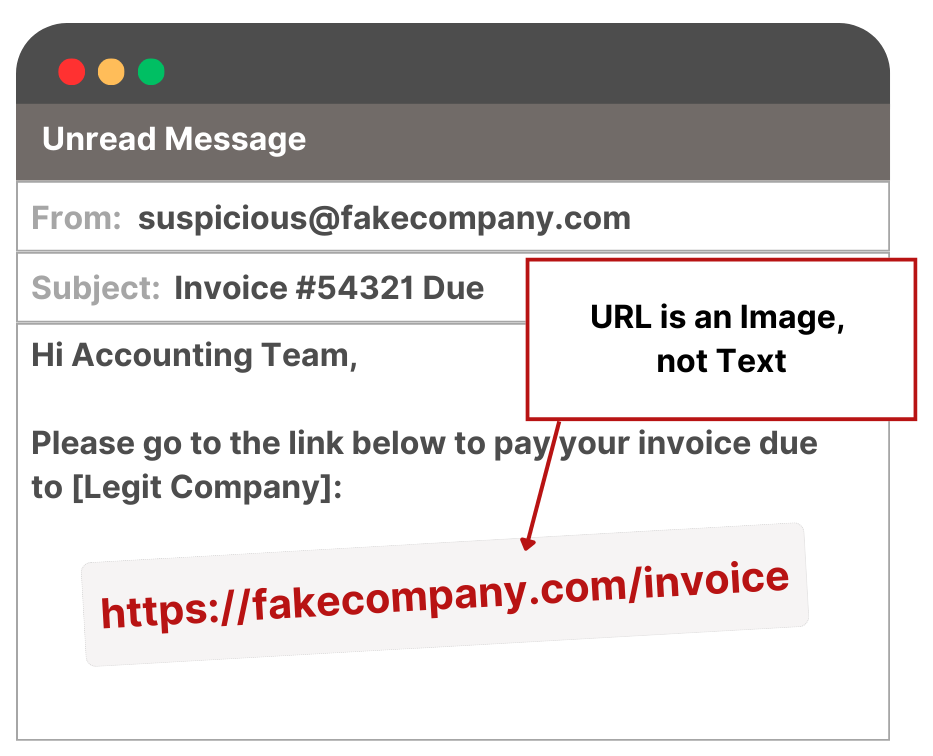
The victim accountant opened a browser, typed in the URL (which wasn’t yet categorized as malicious), and was presented with what looked like a redirection to Microsoft 365 to login. The victim logged in, giving her credentials to the threat actor. Her account had MFA (multi-factor authentication) enabled, but the threat actor later social engineered her to accept the prompt on her phone when he logged in from an IP address in a cloud provider. From there, the threat actor logged into their bank account as her and initiated the wire transfer out of the country.
- There was no EDR alert or relevant telemetry of any kind on the victim’s endpoint
- The Secure Email Gateway indicated nothing actionable due to the URL being an image
- The network proxy wasn’t helpful, because the URL wasn’t known to be malicious
There was a single alert that could have helped:
- an impossible travel alert in Azure Active Directory (now known as Entra)
But that alert never generated an escalation or any response action from their MDR provider, which unfortunately is very common amongst MDRs (and even large enterprises). As a former Red Teamer, I was impressed with the simplicity and effectiveness of the attack. As a Blue Teamer, my mind was forever changed: each of these types of alerts must be considered, even without corresponding or correlated signals that something bad is happening.
#Why MDR providers don’t alert on Impossible Travel and Suspicious Logins
#1. Geolocation of IP Addresses is more of an art than a science
There are many data sources that can map IP addresses to geolocations, but most of them are surprisingly bad, with clearly mismatched locations. Some will round-robin the results between multiple locations associated with an IP, as if to say “I have no idea which is correct, but if I give you all of them, I may be right part of the time.” Some detection products bring their own geolocation enrichments, which are so bad that it makes me wonder if they’re not just going with the lowest bidder for IP Geolocation data. At Wirespeed, when we enrich the locations a second time in our MDR service, with our absolute favorite geolocation provider: IPinfo, some alerts just suddenly seem much more reasonable and less suspicious.
I’ve personally seen “impossible travel” alerts misfire for valid login events because the company resource the user was logging into had a public IP address in Austin, TX, while the user had previously logged into another company resource via a company VPN in New Jersey. It looked like the user impossibly traveled from New Jersey to Austin in 120 seconds, but in reality it was just a mix of public and semi-private company owned network infrastructure.
#2. Employers don’t know where their employees are
It’s true. They don’t. They’ll have a home address for employees, of course, but if an employee is roaming for work vs. pleasure, employers just don’t know. They can’t know. They might have a travel and expense system that will know about company paid trips, such as onsite customer meetings or conferences, but that’s incomplete data, and I’ve never seen any organization operationalize that data for tracking their people in any meaningful way, let alone for security reasons.
Plus, there’s obviously a huge privacy problem here: even if employers track this, can they share it internally with their Security Operations teams? Probably not, and definitely not with a third party managed security (MSSP or MDR) provider.
But even if they did collect paid company travel data to supplement an employee’s known work location and home address - and got past the huge privacy hurdle - that still doesn’t cover the scenarios where the employee is traveling for vacation or fun on the weekends or evenings.
[True story: I once had prominent cybersecurity executive tell me a SOC analyst could just figure out if an employee was traveling by querying their SIEM. 🤦]
So if employers can’t really know where employees are, how can an MDR expect to learn that by asking them? Answer: they obviously can’t.
#3. These alerts are VOLUMINOUS
If your organization has hybrid, work from home, or geographically distributed office locations, these types of alerts fire all the time. Since COVID, that means pretty much everyone has these. In a typical MSSP/MDR SOC, these can fire thousands of times per week. Sometimes per day. It’s a firehouse of alerts that Traditional MSSPs/MDRs just can’t handle.
#So What does my MDR Provider do with these alerts?
Most MDR providers simply ignore them.
That’s right. Deep 6. /dev/null. Recycle Bin. They pretend they never saw them. If your MDR provider has never sent you an impossible travel or suspicious login alert, this is what they’re doing:

Better MDR providers try to make some remote uneducated guesses about which ones are bad, because they are scared or overwhelmed at the idea of Breaking the Fourth Wall of Cyber. So they try to reduce the problem set down and then just hurl a subset of these alerts back over the wall to their customer (READ: you) to investigate. [Wait … aren’t you paying THEM to investigate? 🤔]
#1. IP Reputation
Some providers will check third party threat intelligence feeds to see if the IP is known be malicious. If this actually works, it means the threat actor is lazy. Bad guys swap IPs fast and use ephemeral infrastructure and DevOps automation, just like good guys do. (That’s what I did in my Red Team days, many years ago–it’s cheap and easy to get a new IP.) Often the IP is from infrastructure the threat actor previously compromised; they first hacked something with a positive reputation, and then relay or proxy attacks through it.
So if the IP hits a reputation feed, congrats, you got lucky. Probably not lucky enough to play PowerBall tonight, though.
#2. Sieve with Analytics
Other providers will take all of the suspicious authentication and impossible travel alerts, throw them into some homegrown data munging process, and attempt to divine out which ones are plausibly worse than others. This ranges from statistical analyses to find the outliers to outsourcing the problem to let a Machine Learning algorithm take a guess.
This is error prone for both false positives (sending you escalated cases they never should have sent) and false negatives (dismissing actual bad guys logging in as your users).
#3. Check if the IP is a known VPN or Relay
If the IP address from the event can be determined as a known VPN, relay, or TOR exit node, it certainly increases the suspicion of the event being malicious, but it’s not a guarantee. For instance, one of our customers (begrudgingly) leverages commercial privacy VPNs for a business process; they have no other choice. If we automatically contained an account involved in VPN, some percentage of the time, we would be causing disruption to the business.
Also, threat actors don’t need a “VPN” on a host to relay through it. As a Red Teamer, we’d often use tools like Chisel, SSH, or even just iptables to proxy traffic through a host. So tracking if the host on the far end of that suspicious login alert is at a hosting provider is also helpful to know, because it could be a threat actor doing that. Conversely, it could also be one of your contractors logging in through a VDI (a virtual desktop), doing legitimate work.
VPNs, Relays, hosting providers … even TOR exit nodes … those aren’t silver bullets for handling these kinds of cases, but they can help. (We do all of those checks, too, with our favorite source for that data: IPinfo.)
#4. Analyze Session Consistency
This is the process of analyzing login sessions for inconsistencies and is probably the best option an MDR provider who is afraid of Breaking the Fourth Wall can do today, but it assumes the full telemetry is available to your provider. A simple example:
-
Jane Doelogs in fromIP Address 1withUser Agent 1, assigned Session IDa6e38a37-8b51-4fcf-a5cc-88476bda2d3e. -
Jane Doethen continues Session IDa6e38a37-8b51-4fcf-a5cc-88476bda2d3efromIP Address 2withUser Agent 2.
Jane Doe may have a valid reason for a change of IP, such as a mobile phone going from WiFi to 5G, but it’s unlikely the User Agent (the application, version, and underlying OS) would also change, especially the OS part.
#Wait, isn’t this what ITDR Detection Products do?
Yes. ITDR (Identity Threat Detection and Response) products do some or all of those detection steps listed above. For example, Microsoft Entra ID Protect performs 1, 2, and 4 of those detection types against logins to Entra (formerly known as Azure Active Directory). So a Sloppy/Lazy MDR provider could simply pass these through as escalations and let you deal with a large quantity of false positives.
How Wirespeed is Different
#First, you can bring your favorite ITDR vendor to us.
We don’t lock you in. You get choice. Regardless, we’ll supplement it with additional analysis that we perform in milliseconds, so you can stay ahead of adversaries.
#Second, we’re not afraid to break the fourth wall of cyber
We have a whole set of options available to us that other MDR providers do not. We perform those same common analyses above, but we also reach out directly to the “victim” user over your preferred collaboration tools, like Slack, Teams, Email, and even SMS, to just ask if the login was really them or not. Because we can initiate communication with them as quickly as the detection ends up on the wire, we can often ask them within seconds of the event, so it’s fresh in their mind … or … they can know they were clearly not logging into anything during the last minute, so it’s obviously a bad guy.

#Third, we bring our offensive mindset
I’ve personally ran multiple Red Team engagements where we took over a victim’s account through phishing, generated alerts to the SOC, and did the proverbial “Jedi Mind Trick” to tell them “Everything is good. These are not the ~droids~ suspicious logins you’re looking for.” So we perform MFA (Multi-Factor Authentication) challenges out-of-band to confirm we’re talking to the victim and not the bad guy who has taken over the account. And because we’re that paranoid, in the case of SMS OTP (One Time Passcodes sent over SMS text to the victim user’s phone), we actually check for recent changes to victim’s mobile phone number in the company’s Google Workspace or Microsoft M365 directory - then we send to the previous number we cached instead. In the case where a bad guy takes over an account and immediately updates the phone number, we’ll still fail the authentication and interaction, immediately going to either automated containment or case escalation to the security team, whichever our customer prefers.
#Fourth, we balance convenience with security
Suppose Alice and Bob are both traveling to a meeting at a customer. Alice logs into a company resource from the customer’s free Wi-Fi, generating a suspicious login event, and a Slack DM from Wirespeed asks her if it was her, noting the same city she’s in. She says yes, answers the MFA challenge successfully. Moments later, Bob also logs in, which generates the same suspicious login event, only this time Wirespeed has learned that IP and location combination was recently used by a verified colleague, so the experience is simple. Wirespeed persists that knowledge for a short period of time, minimalizing alert fatigue and negative user experiences.
#Run us Head to Head
We’re ready to run head-to-head against your current MDR provider, because you deserve to have coverage for Impossible Travel and other Suspicious Logins. These should NOT be ignored; they may be the only signal you receive before material impact to your organization.
It takes just a couple minutes to start a FREE Trial, where we will ingest your prior 90 days of alerts and show you cases where we would have reached out to your victim users. Did your MDR provider even tell you about any of them? How about all of them? After that, you’re welcome to integrate with Slack, Teams, or just email, and we’ll watch you for the next 14 days for FREE, reaching out to your users on your behalf. We’ll even help you with a rollout communication plan to inform your workforce that they may be asked about their activity to protect your organization. Quick, Easy, Painless … and Secure.

Want to know more about Wirespeed? Follow us on LinkedIn / X or start a FREE TRIAL today.